Case Study

Ethnic Events

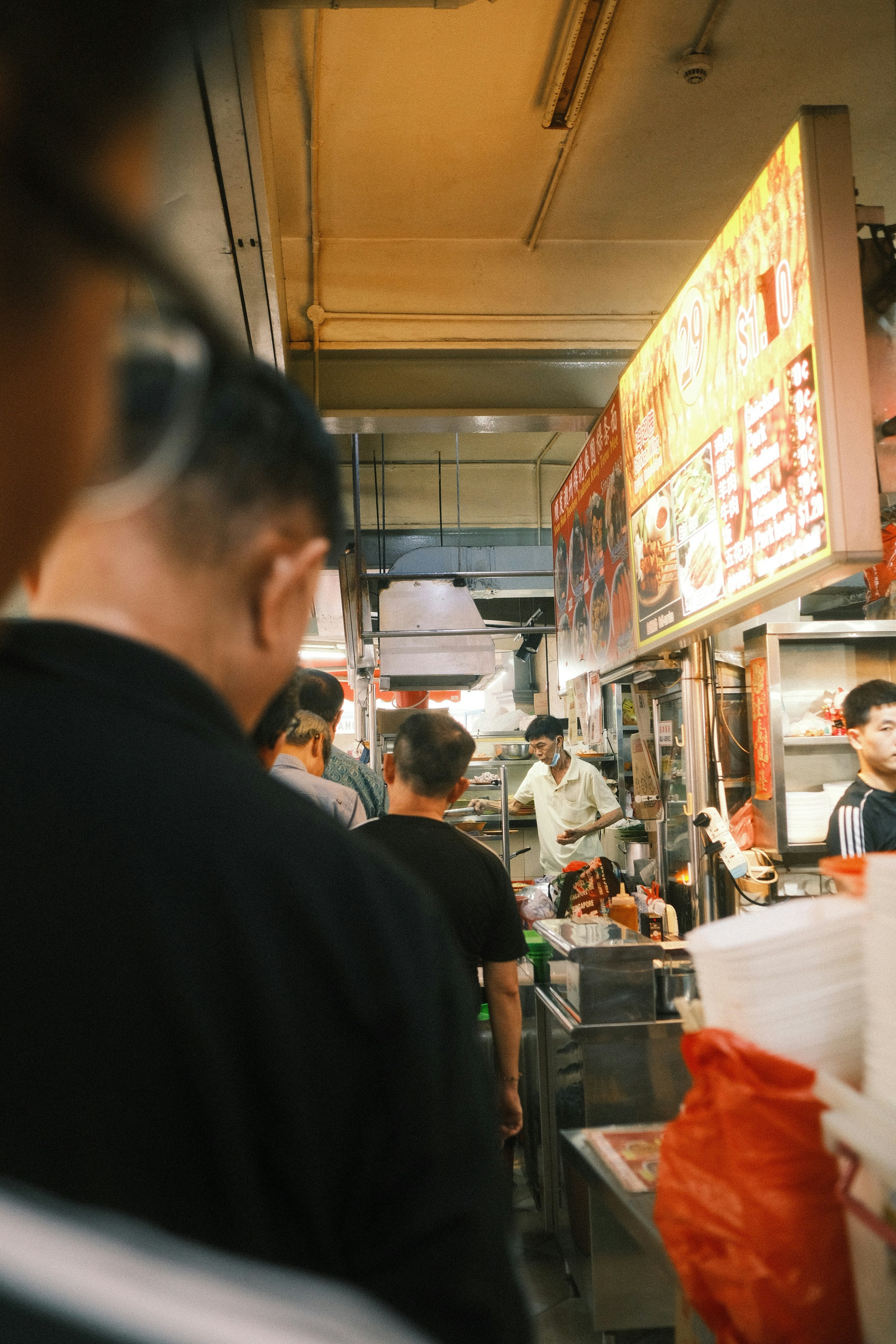
Food market in Chinatown, Singapore
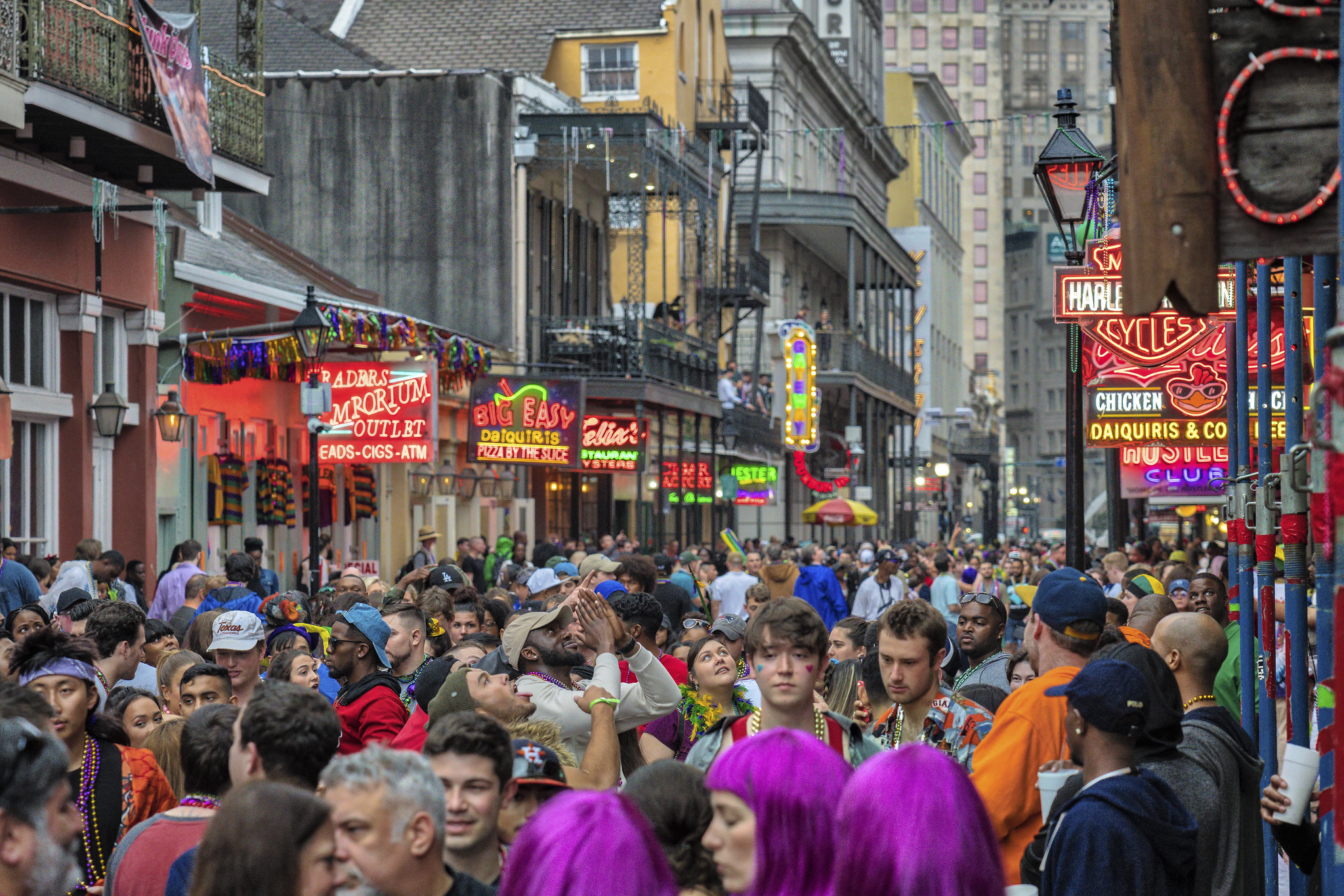
Mardi Gras at New Orleans, LA
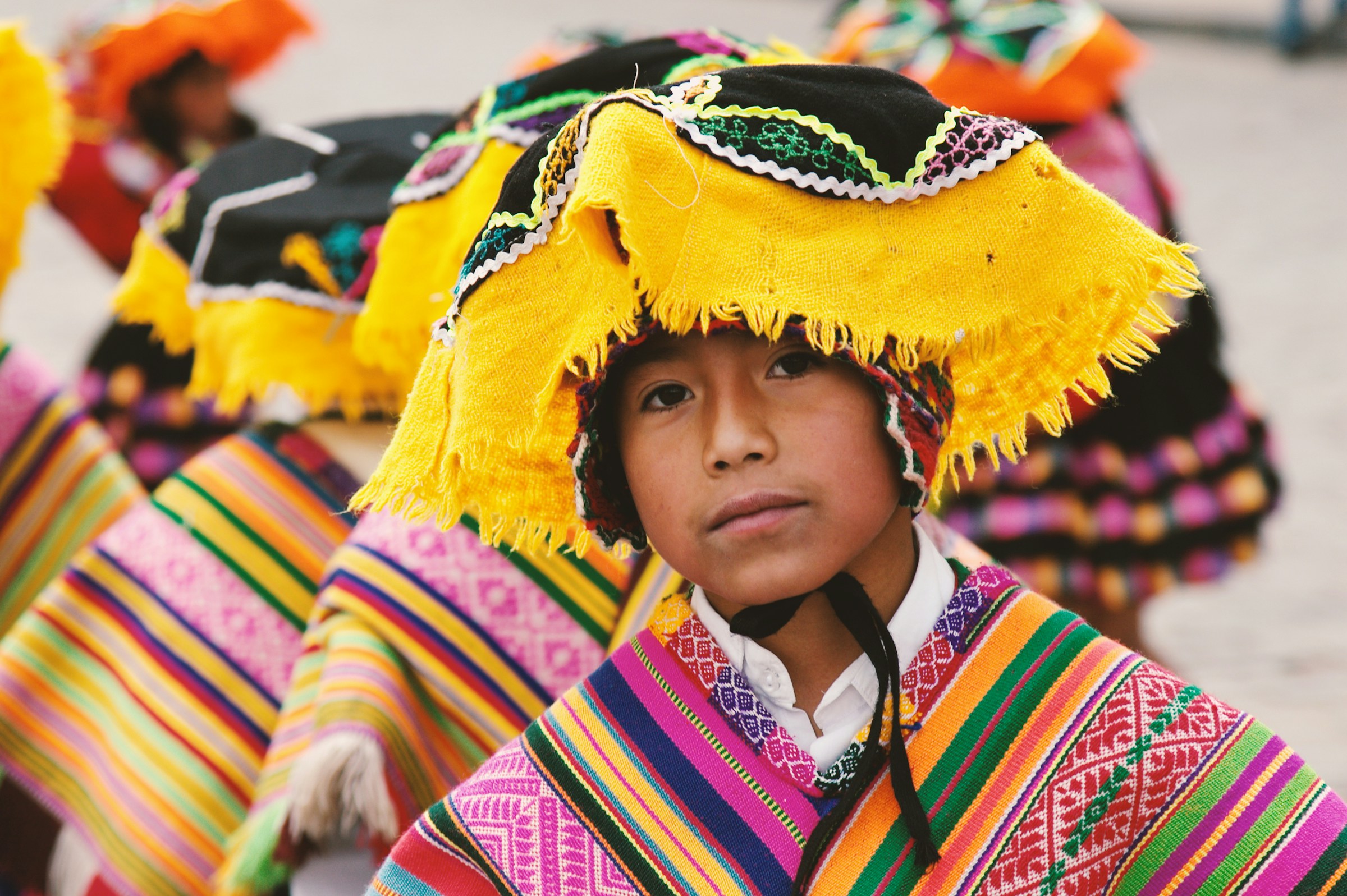
Portrait of an Inka boy, Cusco, Peru

Image Credits

Top Left: Food market in Chinatown, Singapore. Unsplash, photo by Anthony Lim

Bottom Left: Portrait of an Inka boy, Cusco, Peru. Unsplash, photo by Ben Ostrower

Right: Bourbon Street is the epicenter of wild, colorful, and chaotic Mardi Gras celebrations in New Orleans. Photo by Mobilus In Mobili on Flickr

Overview

Ethnic Events is a platform designed to make cultural exploration accessible within U.S. cities. It connects users with cultural events, organizations, and experiences, from food festivals to private corporate workshops, helping people discover culture locally and helping organizers reach wider audiences.

The Brief

Revamp the website to improve event discovery, support organizations showcasing their events, and enable companies to book private cultural experiences through a mobile‑first, responsive redesign.

Details

Client

Ethnic Events, a Chicago‑based startup focused on cultural event discovery

Team

  • Ali Alamshahi - UX Designer
  • Preson Lam - UX Designer
  • Zach Stevenot - UX Designer

Tools

Figma, Miro, Trello, Evernote, Zoom, Google Workspace

Duration

Three Week UX Design Sprint

As the primary designer on the team, I led the end‑to‑end design execution, from research and IA restructuring to wireframes, visual design, and usability testing.

Process & Timeline

We followed a structured three-week design sprint to audit the existing website, conduct user research, and deliver a responsive redesign. Each week focused on distinct goals — from discovery and analysis to design execution and testing.

Week 1: Discovery — kickoff, surveys, comparative analysis, and a full UX audit

Week 2: Synthesis — interviews, affinity mapping, personas, and wireframes

Week 3: Validation — usability testing, design iterations, prototyping, and final handoff

This structure helped us stay focused and deliver a complete, research-driven redesign within a tight timeline. It also allowed us to validate our decisions and iterate quickly based on user feedback.

The Challenge

The existing website made cultural exploration difficult due to:

  1. Poor information architecture
  2. Inconsistent navigation
  3. Missing or misplaced search functionality
  4. Confusing content hierarchy
  5. Low accessibility and readability
  6. Event cards and articles looking identical
  7. Lack of clear categories or ways to browse
  8. No support for saving, following, or sharing events

Users struggled to understand what the site offered, how to find events, or how to engage with cultural content.

The Core Problem

How might we redesign the Ethnic Events website to make cultural discovery intuitive, engaging, and accessible for everyday users, organizations, and companies?

Research

UX Audit Findings

Information Architecture & Navigation

  1. Search placement was inconsistent across the site.
  2. No sign‑in option existed for returning members.
  3. “Become a member” appeared without context or clarity.
  4. Navigation elements changed across pages, creating inconsistency.
  5. Event browsing pathways were unclear and difficult to follow.

Content & Copy

  1. Taglines and section titles lacked clarity and purpose.
  2. The site had no consistent voice or messaging.
  3. Articles visually resembled event cards, causing confusion.
  4. Event images were often cropped, resized disproportionately, or displayed at poor quality.

Accessibility

  1. Low‑contrast text was placed over images, reducing readability.
  2. Overall text readability and hierarchy did not meet accessibility best practices.

Layout & Hierarchy

  1. Key sections (e.g., featured events vs. corporate events) were misplaced or competing for attention.
  2. Decorative elements added visual noise without supporting user goals.
  3. There was no clear prioritization of user tasks.

These findings provided a clear roadmap for restructuring the experience, improving clarity, and establishing a more intuitive, accessible, and consistent design system.

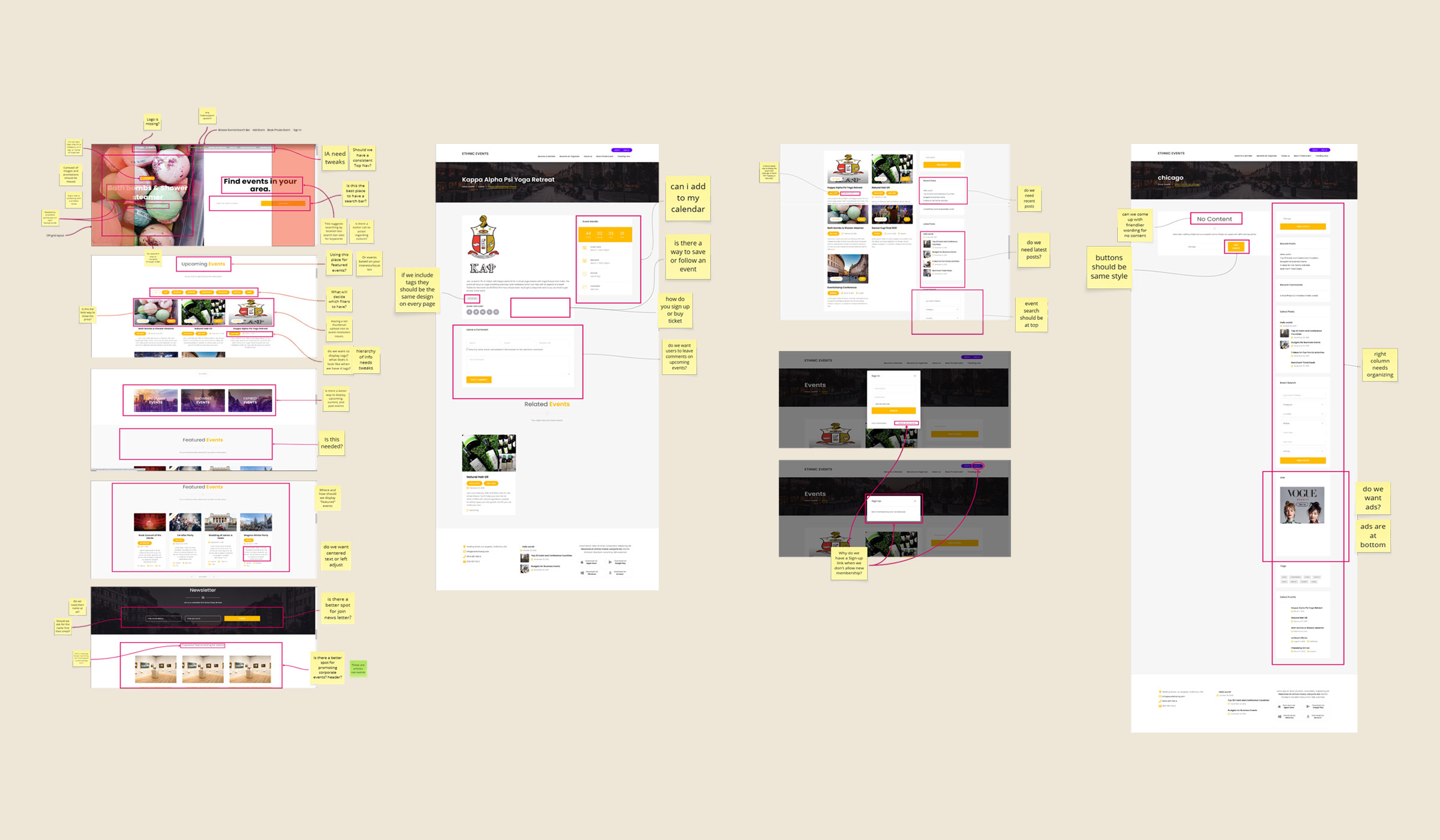
UX Audit of the existing website
Our audit revealed several foundational issues.

Comparative Analysis Insights

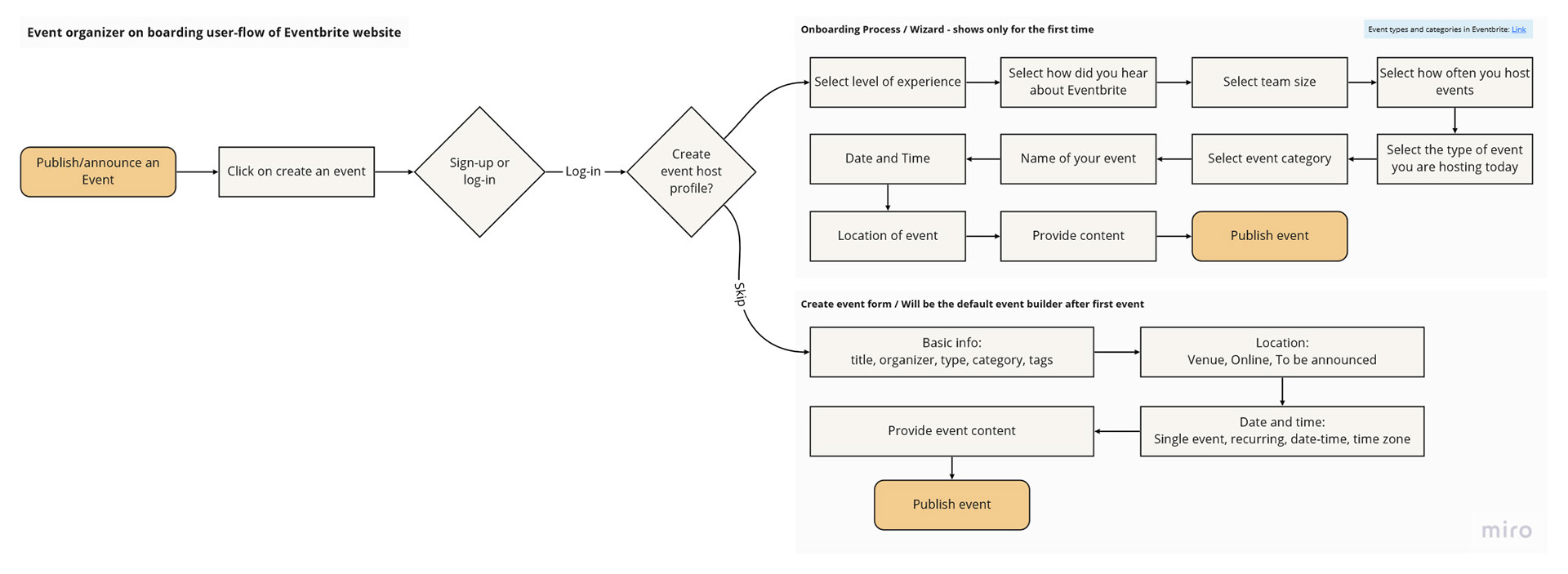
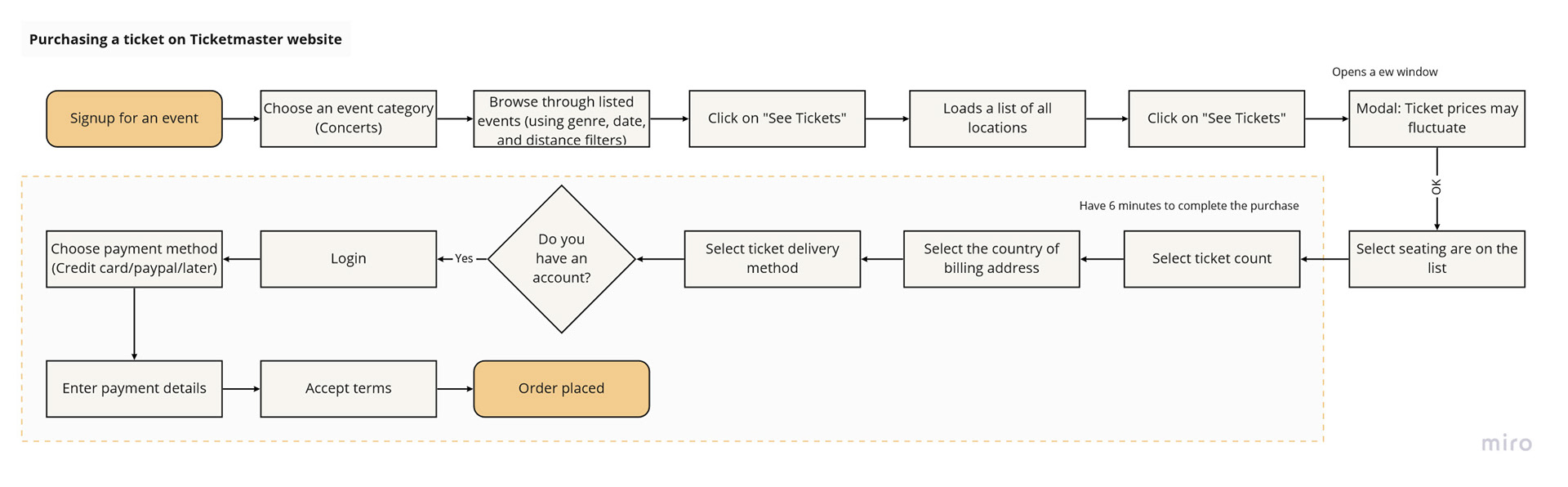
To understand industry standards and user expectations, we benchmarked Ethnic Events against platforms such as Eventbrite, Meetup, Facebook Events, Ticketmaster, and Black Cultural Events. Several clear patterns emerged across these competitors:

Event Card Patterns

  1. Event cards consistently included an image, title, date/time, and a clear “save” or “favorite” action.
  2. Visual hierarchy and metadata were predictable, making events easy to scan.

Browsing & Categorization

  1. Featured categories (e.g., Food, Music, Sports, Holidays) helped users quickly filter and explore events.
  2. Category‑driven browsing was a common entry point across platforms.

Engagement & Social Proof

  1. Showing the number of attendees or friends attending increased trust and encouraged participation.
  2. Social proof played a major role in user decision‑making.

Planning Tools

  1. Calendar views supported planning and helped users visualize upcoming events.
  2. Multi‑view browsing (list, grid, calendar) was a recurring pattern.

Social Integration

  1. Social media integration was widely expected, especially for sharing events or seeing friends’ activity.

These insights helped us establish modern, intuitive UI standards for the redesign and guided decisions around event card structure, browsing pathways, and engagement features.

User Survey & Interview Insights

During our kickoff meeting, we identified several open questions about user behavior and how people currently discover and engage with cultural events. To quickly gather directional insights and validate early hypotheses, we launched a short user survey focused on:

  • How users discover cultural events
  • What aspects of culture they enjoy most
  • The types of events they typically attend
  • Their behavior around online or virtual events

The survey helped us understand user motivations, preferences, and discovery patterns at a broader scale.

Key Takeaways

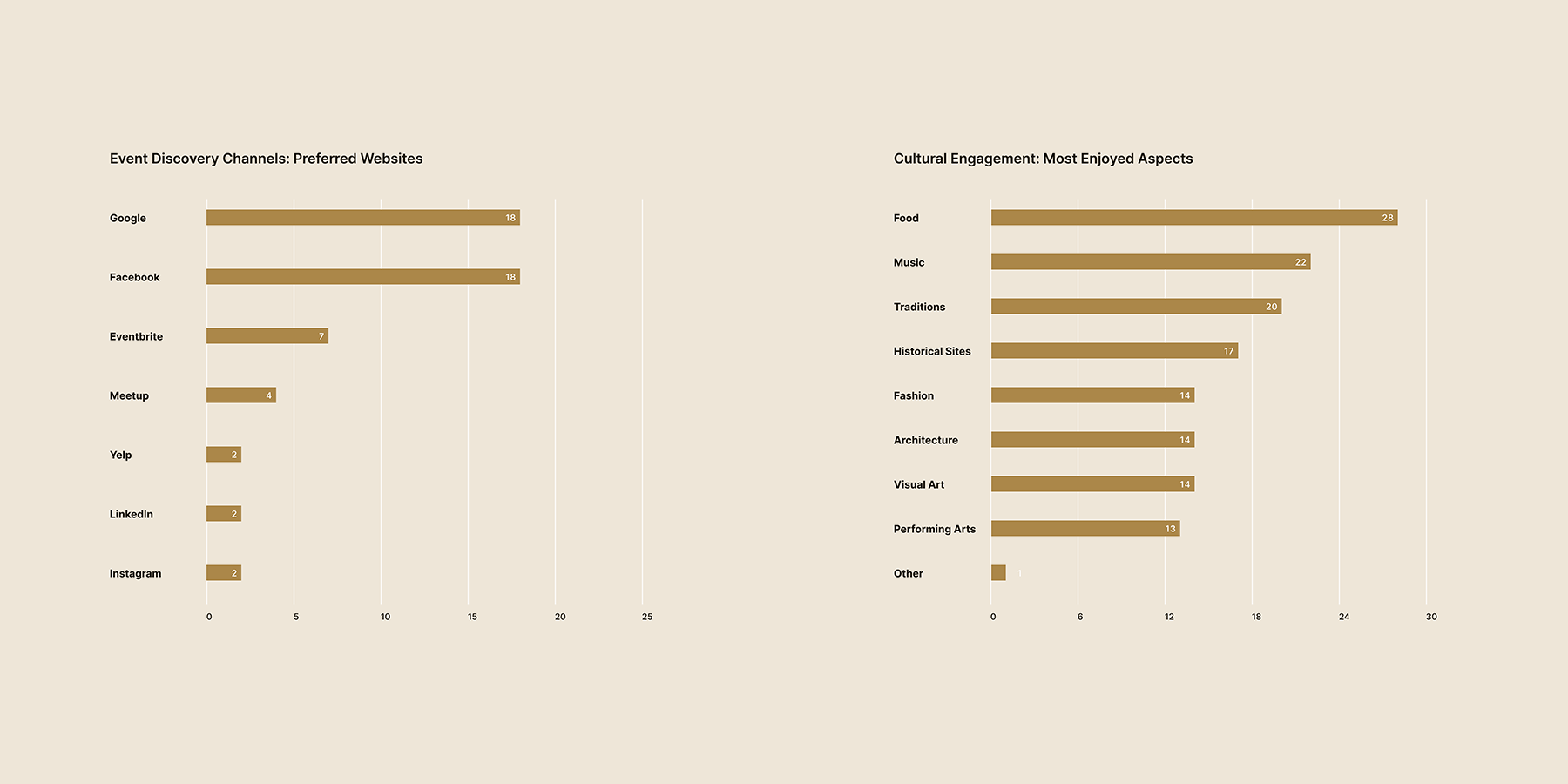
  • Food and music were the most common cultural entry points for users.
  • Users attended events primarily for socializing, enjoyment, learning, and networking.
  • Facebook and Google were the dominant platforms for finding events.
Survey insights showing how users find events and what cultural experiences they value most
Survey insights showing how users find events and what cultural experiences they value most.

Design Process

User Persona: Jessica Kim

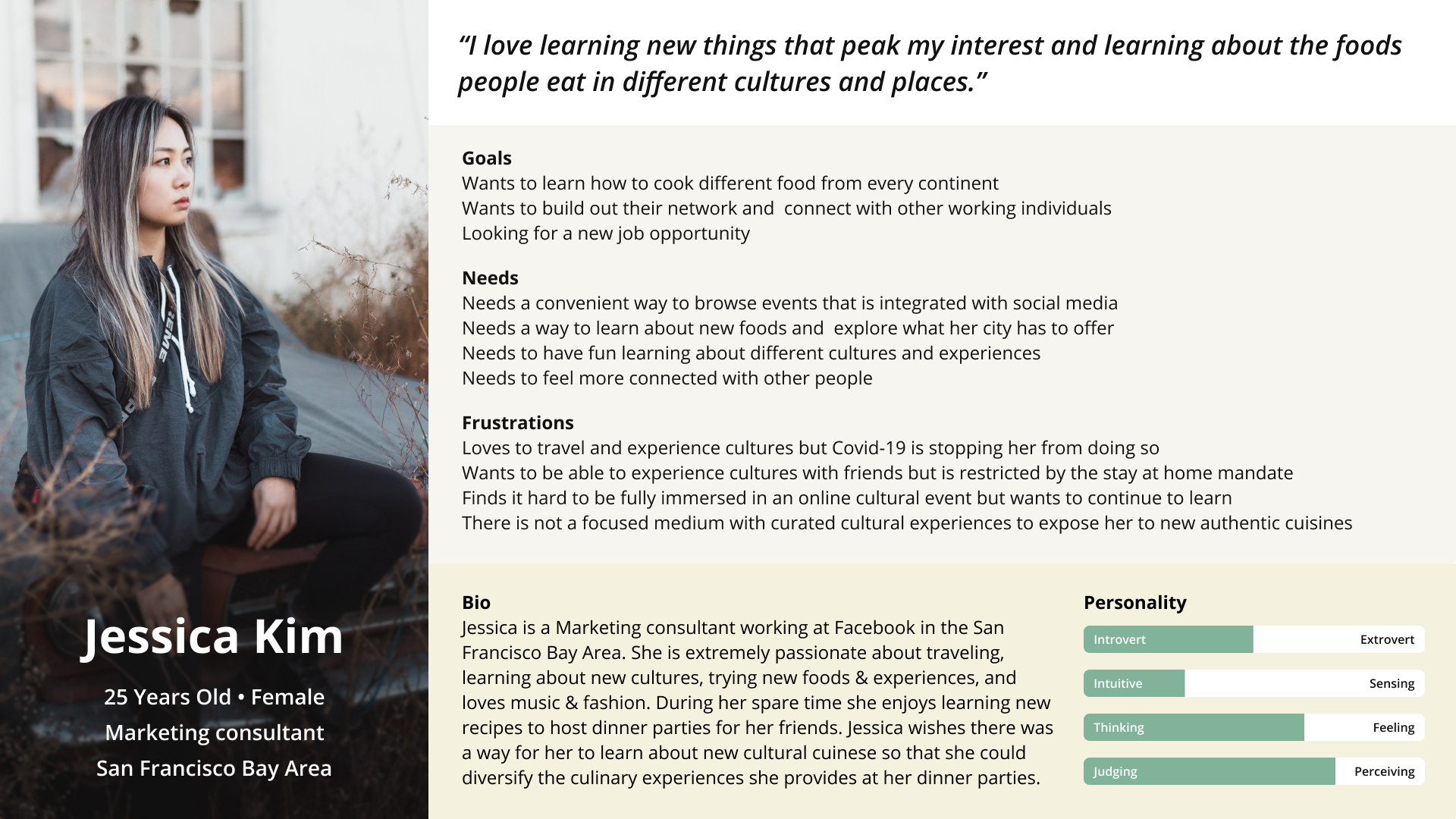
Jessica Kim is a 25-year-old marketing consultant based in the San Francisco Bay Area. Passionate about travel, food, and cultural experiences, she represents a core segment of Ethnic Events’ target audience: the urban explorer who seeks authentic ways to engage with global cultures locally.

Meet Jessica: A food-loving cultural explorer seeking authentic local experiences
Meet Jessica: A food-loving cultural explorer seeking authentic local experiences.

  I love learning new things that pique my interest, especially the foods people eat in different cultures and places.  

Jessica Kim User persona

Jessica’s persona helped us prioritize features like category-based browsing, food-focused content, and social media integration. Her desire for immersive, authentic experiences directly informed the creation of the “Culture Discovery” section and guided decisions around event card design, search functionality, and content hierarchy.

Problem Statement

Jessica needs an intuitive way to discover authentic cultural experiences in her city because existing platforms make it difficult to find curated, high‑quality events that match her interests in food, learning, and community.

How Might We Statement

How might we help Jessica easily discover authentic cultural events and experiences in her city so she can explore new cuisines, learn about different cultures, and connect with others?

User Flow: Event Discovery and User Actions

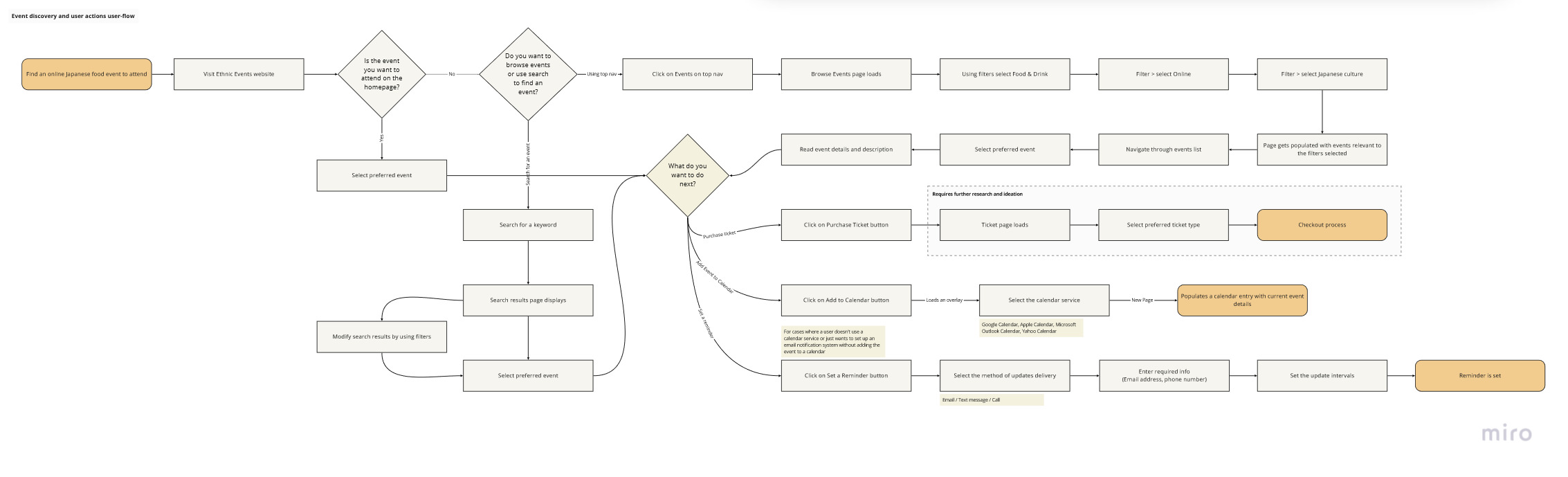
To better understand how users navigate the Ethnic Events platform, we mapped out a user flow based on a common goal:

“Find an online Japanese food event to attend.”

This flow helped us visualize the steps, decisions, and potential friction points a user might encounter — from landing on the homepage to purchasing a ticket or setting a reminder.

Key Pathways Explored

  • Homepage scanning: Is the desired event featured or easily visible?
  • Navigation choices: Users can either browse via the top navigation or use the search bar.
  • Filtering behavior: Users apply filters such as Food & Drink, Online, and Japanese Culture to narrow results.
  • Event selection: Users read event details before deciding to engage.
  • Action options: Users can either purchase a ticket or set a reminder using calendar or contact info.

Why This Flow Matters

This user flow revealed several critical UX opportunities:

  • The need for clear, consistent navigation and search placement
  • The importance of intuitive filtering and category visibility
  • The value of offering multiple engagement options (purchase vs. reminder)
  • The potential for calendar integration and social sharing to boost participation

By grounding this flow in a real user goal, one that reflects Jessica’s interests in food, culture, and convenience, we were able to design a more intuitive, mobile‑friendly experience that supports both discovery and action.

User flow: Discovering and engaging with cultural events on Ethnic Events
User flow: Discovering and engaging with cultural events on Ethnic Events.

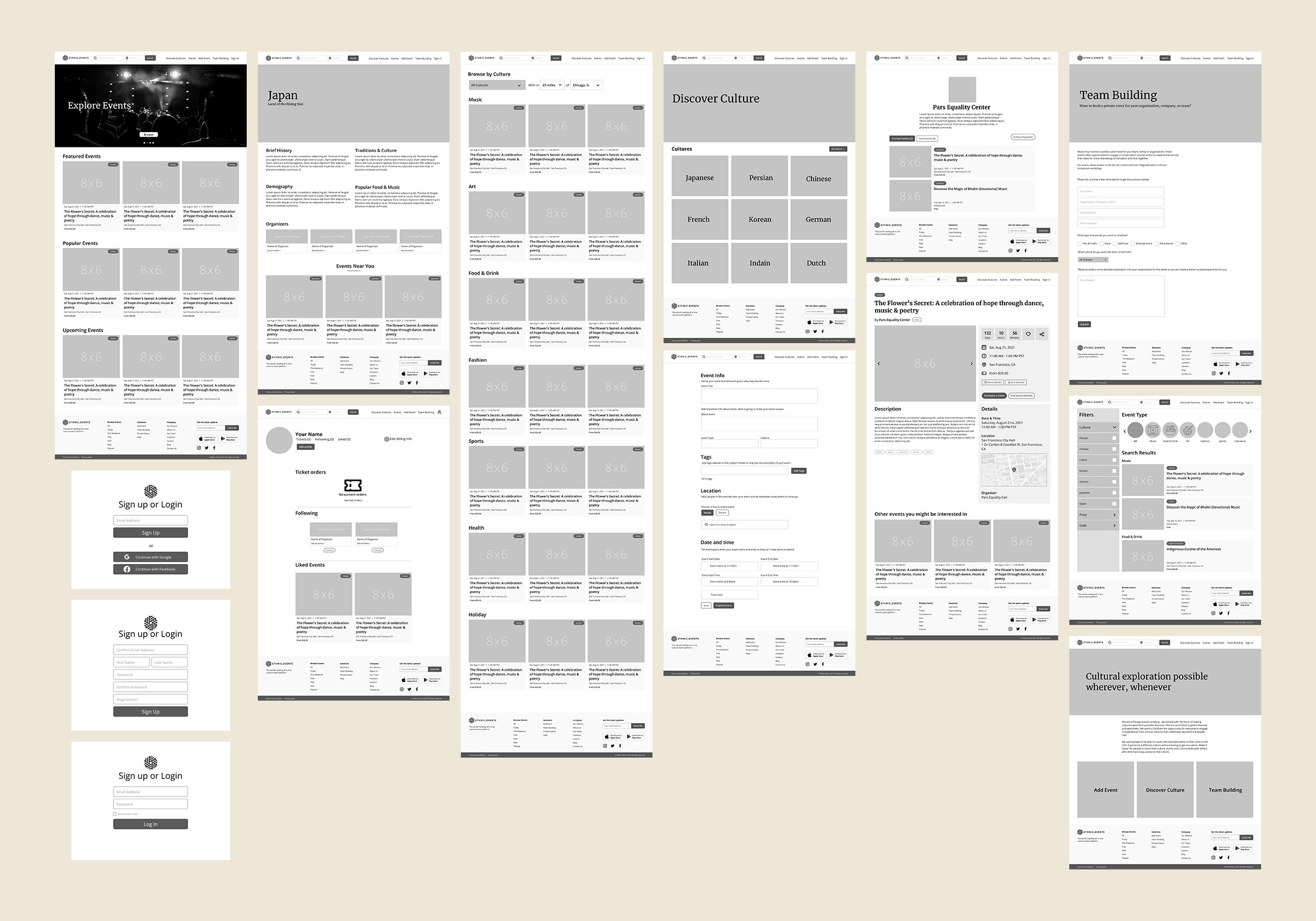
Wireframes: Exploring and Refining the Experience

Before moving into high‑fidelity design, we created a series of wireframes to explore how users like Jessica could more easily discover cultural events, learn about new cuisines, and take meaningful actions on the platform. Our early explorations focused on simplifying the experience, clarifying hierarchy, and supporting both users and event organizers.

Accelerating Event Discovery

One of our primary goals was to make event discovery significantly faster. We explored layouts that prioritized search, clear categories, and intuitive browsing paths. This meant reducing friction at the top of the experience and giving users multiple ways to find what they care about, whether through search, filters, or curated cultural content.

Designing a Smarter Event Card

We needed an event card that could communicate a lot of information without feeling cluttered. Early sketches focused on establishing a clear visual hierarchy: image first, then essential metadata like date, time, category, and price. The goal was to help users scan quickly while still feeling confident in the event details.

Empowering Users Through Search & Filters

We drafted a search results experience that gave users more control. Clear filters, sorting options, and category icons helped guide users visually and reduce cognitive load. This approach aligned with Jessica’s need to explore events based on her interests — especially food, culture, and learning.

Simplifying Registration & Ticket Purchase

We also explored ways to streamline user registration and ticket purchasing. The wireframes focused on reducing steps, clarifying form fields, and making the process feel lightweight. The goal was to remove barriers and support quick decision‑making.

Structuring a Clear, Informative Event Page

The event page needed to balance rich information with ease of navigation. We explored layouts that included:

  • A countdown to the event
  • Date, time, and location with an integrated map
  • Ticket prices and organizer details
  • Related events
  • Key actions like “Add to Favorites” and “Share”

The challenge was to keep the page informative without overwhelming the user.

Supporting Event Organizers

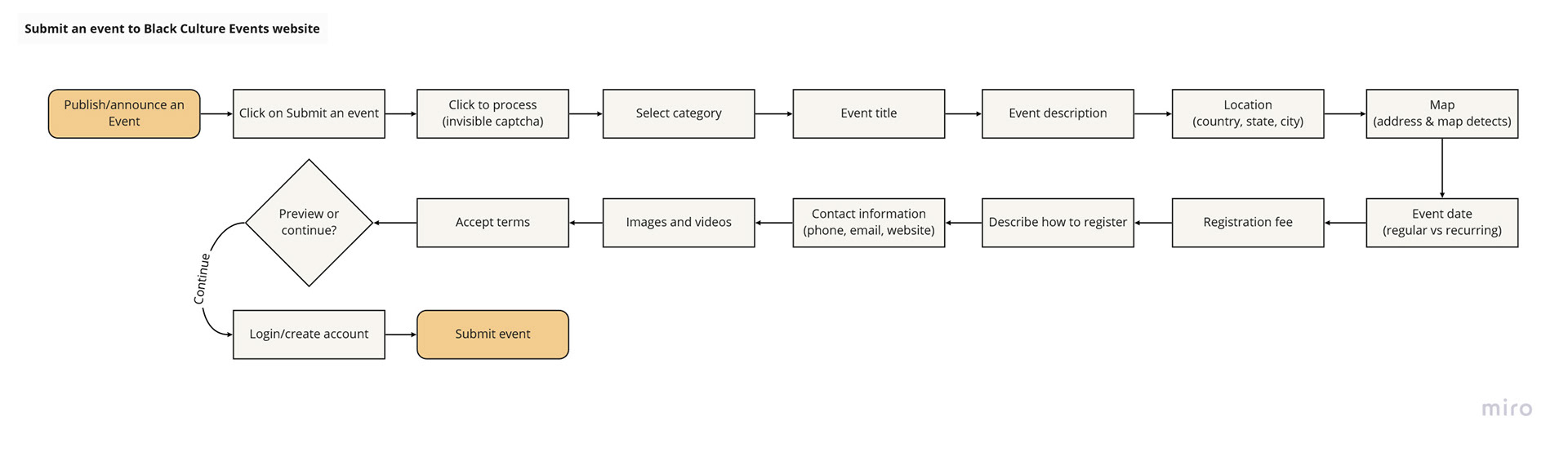
We also wireframed a simplified event submission flow. The goal was to make it easy for organizers to add events, control their content, and feel confident about how their event would appear on the platform.

Introducing Culture Discovery

Finally, we explored new ways for users to learn about cultures beyond events. This led to the creation of a Culture page. A space where users could quickly learn about a culture, explore related events, and dive deeper into food, traditions, and experiences.
Low‑fidelity wireframes

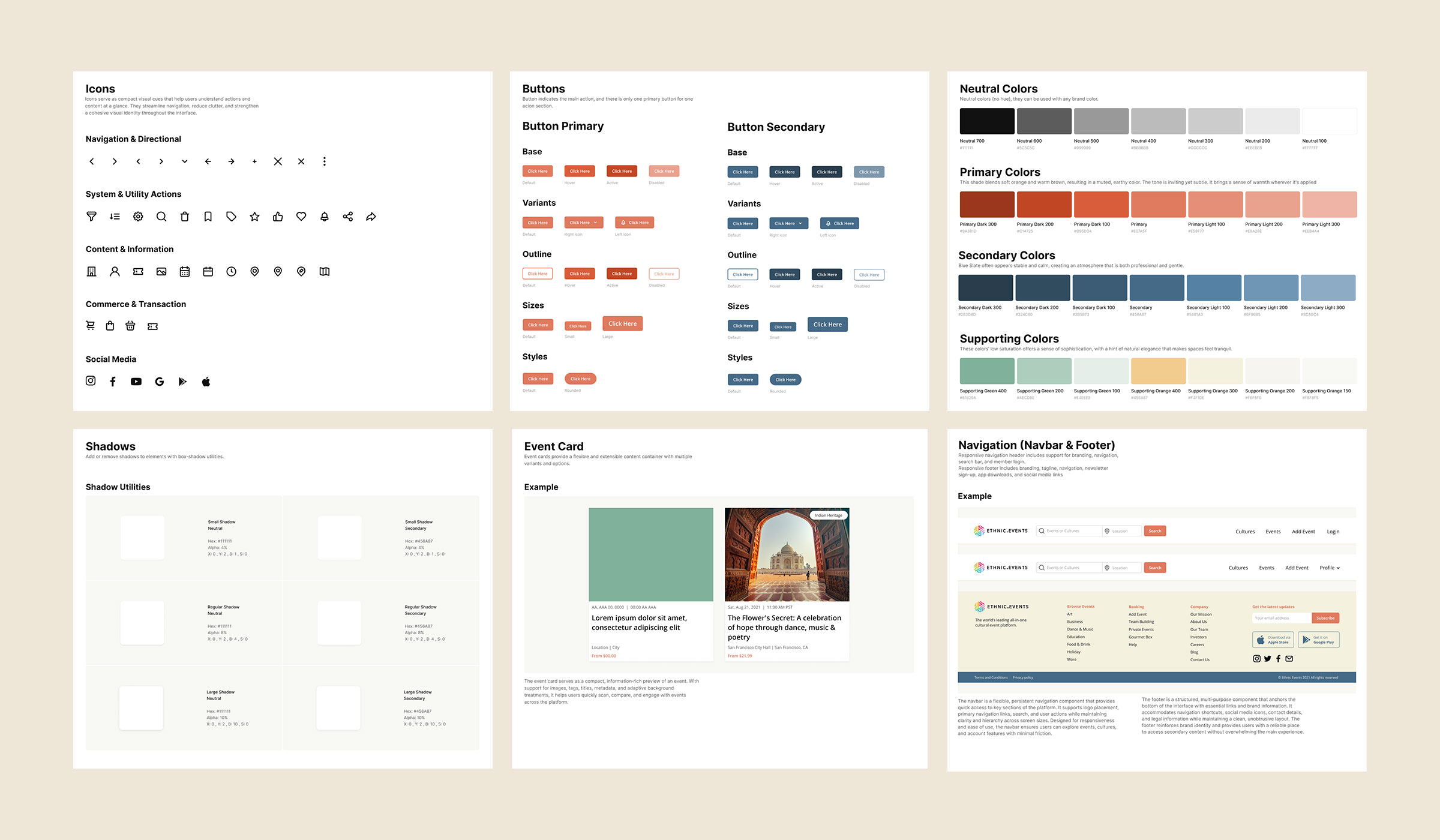
Design System

A comprehensive design system was essential to maintain consistency across pages, components, and platforms. The system provides scalable, accessible building blocks that streamline development and ensure a cohesive experience for users and event organizers. It also introduces a visual language, through color, iconography, and imagery, that highlights and celebrates cultural diversity.

Overview of the design system

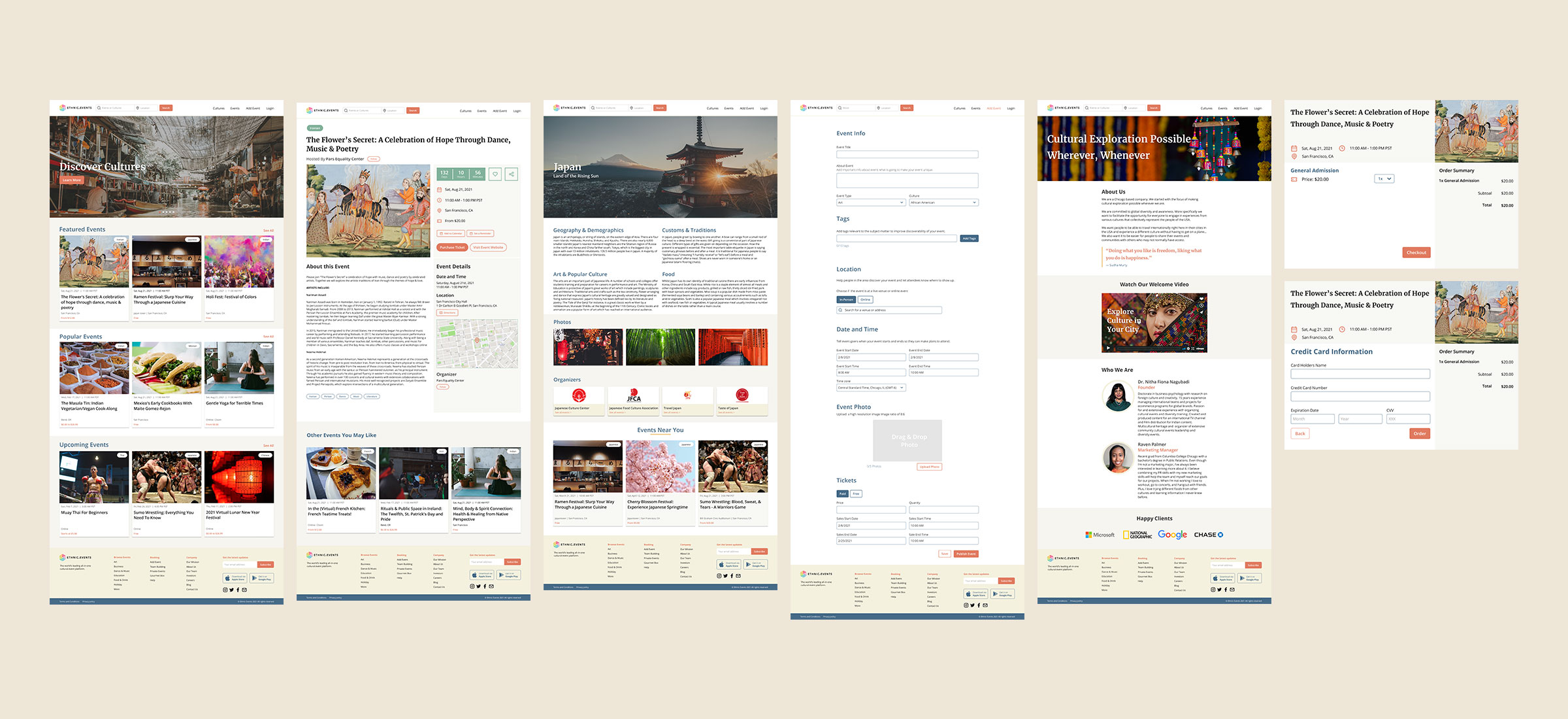
Prototype

The high‑fidelity prototype brings the redesigned Ethnic Events experience to life with polished visuals, refined interactions, and a cohesive design system. Created in Figma, it demonstrates how users can seamlessly discover events, explore cultures, and complete key actions, from filtering and browsing to purchasing tickets. This prototype reflects the final visual direction and validates how the system performs in real user scenarios.

View the Prototype
Overview of the high‑fidelity prototype

Usability Testing Overview

To validate the redesigned experience, we conducted a usability test focused on the core actions users perform on Ethnic Events: discovering events, exploring cultural content, managing accounts, and completing key interactions such as adding events to a calendar or identifying event details. Participants were asked to complete a series of realistic scenarios that reflected how someone like Jessica would naturally use the platform.

Across all scenarios, users demonstrated a high level of success and efficiency. Most participants were able to locate events, interpret event information, navigate cultural pages, and complete account actions with ease. Completion rates ranged from 95% to 100%, and tasks were typically completed in just a few seconds, indicating that the navigation structure, event hierarchy, and interaction patterns were intuitive and easy to follow.

Key Findings & Opportunities

Usability testing surfaced several opportunities to refine the experience further:

  • Sorting by price: Users wanted a way to sort search results by price to quickly identify free or affordable events.
  • Sorting by online events: Users expected a dedicated sorting option for online events, not just filtering.
  • Footer clarity: One user was confused by the “Solutions” label in the footer, suggesting the need for clearer terminology.
  • Clickable card affordance: Users wanted a stronger visual cue that event cards were clickable.
  • Persistent filters: Users wanted filter options to remain accessible while browsing, not only at the start of the search flow.

These insights informed the next iteration of the design, helping us refine navigation clarity, improve discoverability, and strengthen the overall user experience.

Next Steps

The usability findings not only validated the core experience but also highlighted clear opportunities for growth. Building on this momentum, we outlined a set of strategic next steps to enhance the platform, deepen user engagement, and support event organizers more effectively.

  • Optimize the checkout process to improve conversion and reduce friction.
  • Conduct a second round of usability testing on the high‑fidelity prototype with new task scenarios.
  • Begin designing a dedicated mobile app experience.
  • Develop an all‑in‑one organizer platform with marketing tools, including email automation, Google Ads integration, and social media publishing.

Final Thoughts

This project brought together research, strategy, and thoughtful design to reimagine how people discover and celebrate cultural events. Through iterative exploration, usability testing, and a cohesive design system, we created an experience that feels intuitive, inclusive, and scalable. The work completed here lays a strong foundation for future enhancements and continued growth of the Ethnic Events platform.